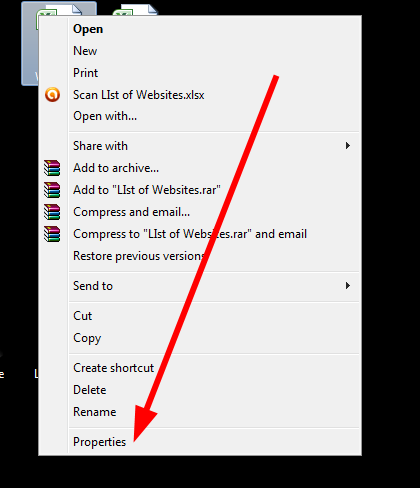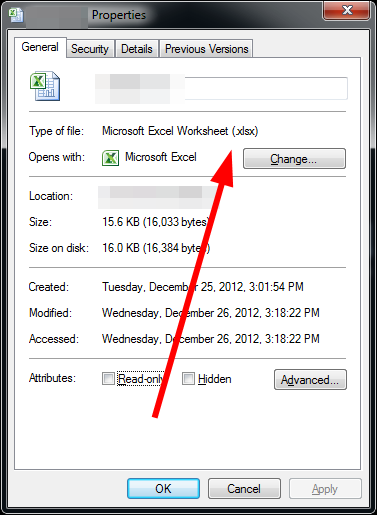
(1) Our Guarantee: Your Email Address will NEVER be sold, rented or provided to any third party. Period.
(2) You will never receive email correspondence unless you expressly opt-in.
(3) We have put a lot of work into providing users a top quality document management service. Online conversion is simply the first part. We are nowhere close to being finished. Keep checking back as we add new features in the coming months. We think you will be satisfied.
Convert from PDF:
(some conversion support OCR conversion for scanned PDF)
PDF to Open Office Writer format
PDF to Open Office Calc format
PDF to Open Office Impress format
PDF to image BMP
PDF to image JPG
PDF to image GIF
PDF to image PNG
PDF to image TIF
PDF to text
PDF to HTML
PDF to MS Word
PDF to MS Excel
PDF to AutoCAD (dwg)
PDF to AutoCAD (dxf)
Convert to PDF:
Bmp to PDF
Word (doc, docx) to PDF
Gif to PDF
htm to PDF
html to PDF
jpeg to PDF
jpg to PDF
log to PDF
mht to PDF
mhtml to PDF
ODF to PDF
ODP to PDF
ODS to PDF
ODT to PDF
PNG to PDF
PPS to PDF
PPT to PDF
RTF to PDF
SDA to PDF
SDC to PDF
SDD to PDF
SDS to PDF
SDW to PDF
SXC to PDF
SXD to PDF
SXI to PDF
SXM to PDF
SXW to PDF
TIF to PDF
TIFF to PDF
TXT to PDF
WRI to PDF
Excel (xls, xlst) to PDF
Publisher (pub) to PDF
Convert from XPS:
Convert to Open Office Writer format
Convert to Open Office Calc format
Convert to Open Office Impress format
Convert to image BMP
Convert to image JPG
Convert to image GIF
Convert to image PNG
Convert to image TIF
Convert to text
Convert to HTML
Convert to MS Word
Convert to MS Exsel
Other File Conversions:
Excel to CSV (XLSTOCSV)
XML to LINT (XMLLINT)
HTML to RSS (HTMLTORSS)
ASC TO PDB
ASC TO EBC
UNIX TO DOS
DOS TO UNIX
MAC TO UNIX
FIX TO DELIM
DELIM TO FIX
CSV TO DELIM
SORT FILE
PDF INFO
COMPARE FILES
MP3 INFO
FILEINFO
ICONV
We think you'll be very satisfied with our premium account option. Fill in your information below to get started. Signing up and starting your premium conversions takes a matter of seconds.
You'll Love Your Premium Account!
Premium Users don't have a 24h file storing limit. All your converted files are stored in your online account and you can access them anytime via your File Manager.
A winning formula!
Cometdocs is a one of its kinds free online document conversion interface that offers a large set of document conversions that can't be found anywhere else online. Its unique features include on the fly OCR conversion capabilities, over 50 different conversion options and proprietary XPS and PDF conversion abilities that retains formatting, images and text in the selected output format. And best of all for users -> it is available free of charge.
Sign up for your free account today and give it a try!
When working with computers on a daily basis, being able to identify what type of file you're dealing with is essential.
Whether you're working with different program applications or browsing online, one of the main concerns of handling an unidentified file format is determining what program applications are needed to open it.
Even blind file transfers can produce the same uncertainty since an unidentified file type on your computer can either compromise your work or your entire system. Both sender and receiver rely upon both the compatibility and integrity of a single file.
Where different platforms are involved, verifying a file format to troubleshoot issues between digital files and computer devices can be difficult because the categorization of files can vary from one system to the next. Finding a solution first requires knowing the platform to which the file belongs before anything else can be resolved.
The file categorization of different systems becomes a major factor when identifying files. To illustrate, one of the major differences that sets the UNIX system apart from the Windows system is the difference in their file naming conventions. While Windows uses a three letter file extension and a distinctive icon, UNIX files don't.
In addition, UNIX file extensions don't necessarily reveal the file's function or contents as the .doc or .ppt file extensions do at a single glance. Thus, identifying any file format simply by looking at its filename is no longer a reliable way of classifying it. You need to analyze the file internally.
The File Utility
To do so, you can use the File utility, a command line tool used to identify an unknown file format. This UNIX utility can determine the nature of a file's content by examining the file's digital information.
The iConv File utility can do the same for any unidentified file formats located on your computer. Thus, without the need of a UNIX interface, you can use this online routine to inspect the file you upload. It will return information about the file type in your browser.
Just Need a Single Conversion Format? Bookmark these sites:
PDF to Word Converters: Convert PDF to Word, PDF to Word, PDF to Doc, PDF Into Word
PDF to Excel Converters: PDF to XLS, PDF to Excel, Convert PDF to Excel, PDF to Excel Converter, PDF to XLS Converter
PDF to PowerPoint: Convert PDF to PowerPoint, PDF to PowerPoint Converter, PDF to PPT
PDF to CAD: Convert PDF to AutoCad, PDF to DXF
PDF to HTML: PDF to HTML
PDF Creation: PDF Converter, PDF Conversion
Word to PDF: Word 2 PDF
Excel to PDF: Convert XLS to PDF, XLS to PDF
Powerpoint to PDF: Powerpoint to PDF
Publisher to PDF: Publisher to PDF
Online OCR Conversion: Scanned OCR PDF to Word
© 2011 Cometdocs.com All Rights Reserved.